Loxley Labs/ Apps / Cartographer
Cartographer icon

Cartographer for Minecraft

Minecraft: Java 26.1+ or 1.21.11 · Android

A live map of the world you are actually playing: your position, your builds, and what is out past the edge of them. Structure coordinates match /locate exactly.

Needs the free PC modSingle-playerNo adsNever touches the internet
$2.99once, yours to keep
Get it on Google Play
SHA-256: 9f053e2588ce84d8a8bc203124bb0c1971cb509ff9ba0f53f241d5ced34665a3
What you need

Two pieces. One of them is free.

The mod lets the app read your game. The app draws the map. They find each other on your own wifi.

On your PC

Loxley Map Mod

Free, always

Runs inside Minecraft and answers the app’s questions about your world. It only reads, never changes anything, and never sends anything outside your own network.

SHA-256, Minecraft 26 build: d30138113139377dbc58367bcc966aabc99762548a4ecf6b472be995d8d2c8bb
SHA-256, 1.21.11 build: 49592f9900a2e7348874834555c96914bd1d429ce0279402fed262c1fca4b984
Needs Fabric Loader and Fabric API. Drop the .jar into .minecraft/mods and start the game.
Take one build, not both: they share an id, so two in the mods folder is a loader error.
This mod bundles ZXing core 3.4.1, Apache License 2.0, for the pairing QR code. Credits and licenses
On your phone

Cartographer

Free, or $2.99 once

The map itself. Finds your PC on its own, shows where you are, remembers where you have been, and gives exact coordinates for any structure.

Cartographer Free SHA-256: 64fb2a46acb59242292f468f52a95c9f330d0a9346c9501c7a15e847caea278d

It will not show underground on someone else’s server, by design: seeing through stone is indistinguishable from cheating no matter what you meant by it, so below-surface mapping only answers for a world you host yourself. Ordinary surface mapping works anywhere, the same line JourneyMap and Xaero’s draw.

Free or paid

Same map. The paid one sees your real world.

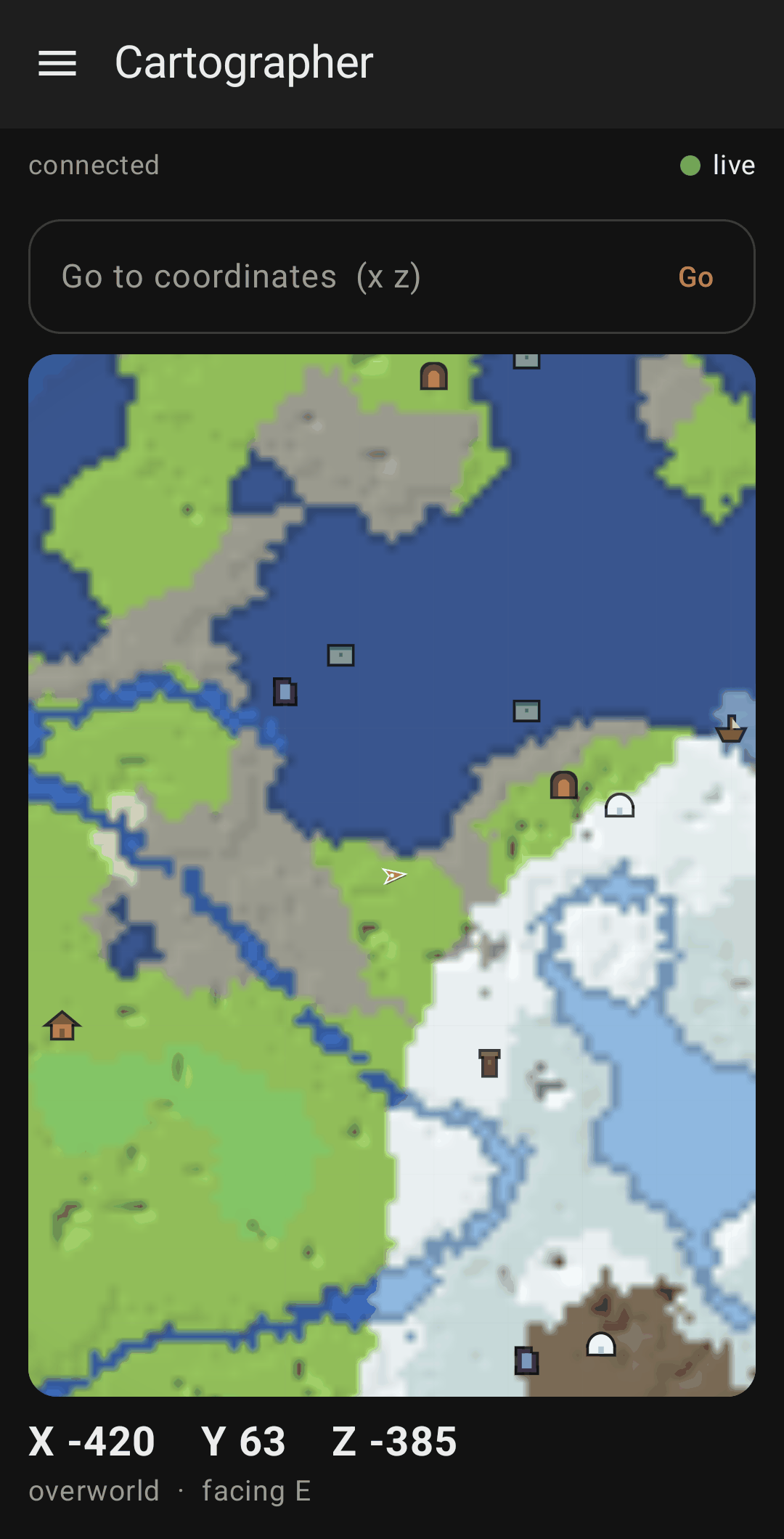
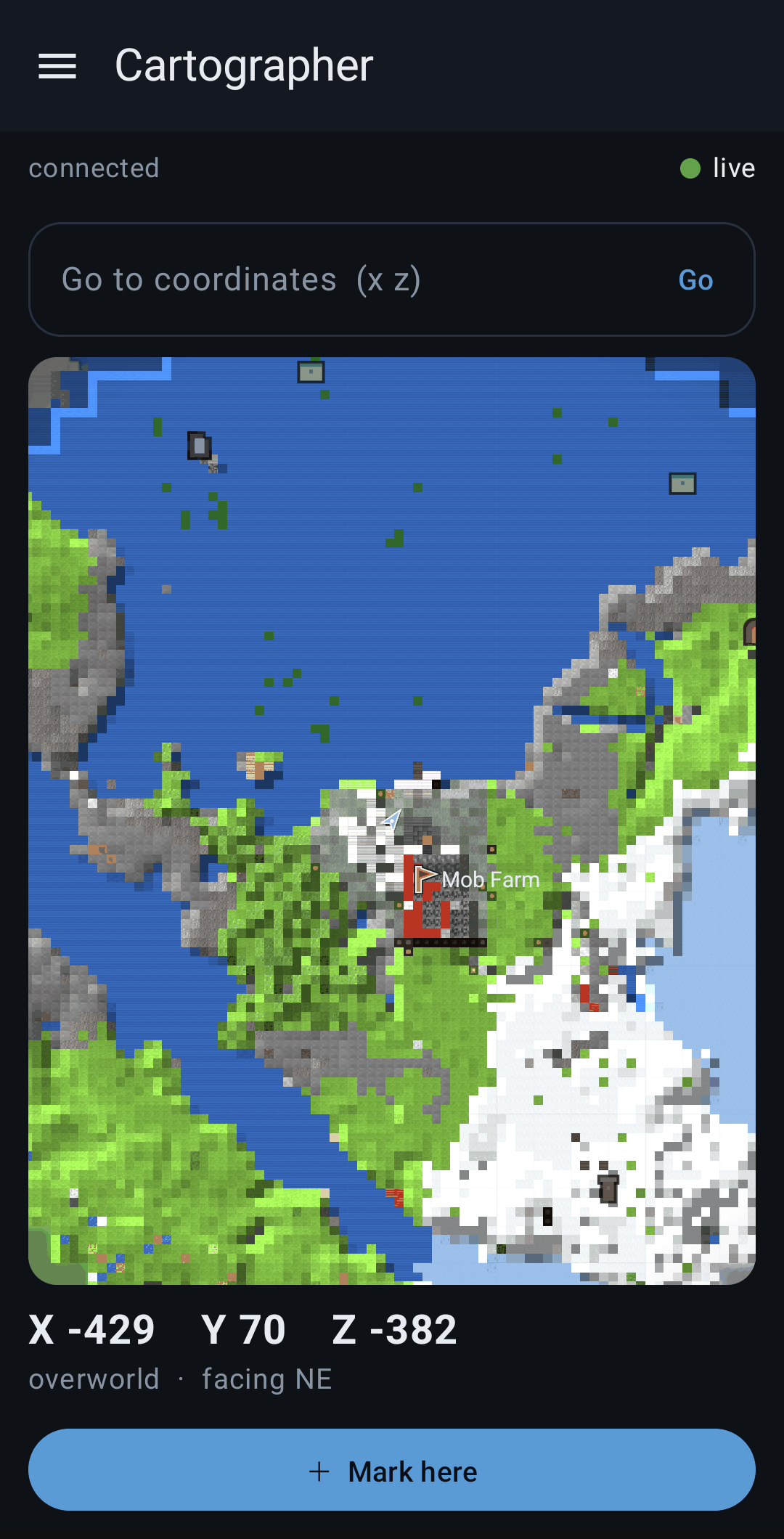
Drag the handle. Left is Cartographer Free, drawn from your seed. Right is the paid app, drawing the blocks you actually placed.

Cartographer FreeCartographerFreePaid
⇆
The seed map: terrain and biomes, as far as you scroll✓✓
Every structure, at the coordinates /locate gives✓✓
Coordinate search✓✓
Your live position and facing✓✓
Your real world: the blocks you placed, drawn as themselves—✓
A 3D view of everything you explored, in your resource pack—✓
Fog of war, remembered for good—✓
A Y slider down through your caves—✓
Map files to name, export and share; view them without the PC—✓
Stream to PC for OBS, waypoints, structure filters—✓
Keeps mapping in the background—✓

The free app reminds you once, when it opens, that the paid one exists. That is the only difference in how it behaves. Free on Google Play too.

What it does

The map that reads your actual game.

Most map apps redraw your world from the seed in their own code, so they drift from the real game. This one asks Minecraft’s own generator, inside your game, which is why its coordinates agree with /locate.

01

Your world at block level

The blocks you actually placed, drawn as themselves, with your live position and facing read from the game.

02

In 3D, sliced at your depth

Everything you explored as a model you can turn, textured with your resource pack. Underground, the map cuts through at your level, so you see the tunnel you are in.

03

Your builds, as built

Orbit it, fly through it, or cut it down to a height.

04

Structures with exact coordinates

Worked out with the same routine the game uses for /locate. Tap one for its position and distance.

05

Choose what it marks

Villages, trial chambers, monuments, strongholds and the rest: show only the kinds you want.

06

Past the edge of the loaded world

Zoom out and the terrain keeps going, computed from your seed by your own game.

07

While you play

Keep the screen on, or keep mapping in the background with a notification that stops it in one tap. Waypoints too, and other players if you turn them on.

08

Stream to your PC

Send the map to OBS for your stream, set up from the same screen.

Set up in two minutes

Four steps, once.

Get the modPick your Minecraft version above and download it. Free.
Drop it in your mods folder.minecraft/mods, next to Fabric API, then start the game.
Load a worldAny single-player world. The map reads the world you are standing in.
Open the app on the same wifiIt finds your PC by itself. Nothing to type.
You decide what it reveals

No spoilers unless you ask.

Ore stays hiddenOff by default and drawn as the plain stone around it, with no hint it is there.
Fog of war by defaultThe map fills in only where you have been. A world you have not explored cannot be un-spoiled, so the choice is yours.
No account, no cloudNo sign-in, no analytics.
Never onlineIt talks to your own PC on your own wifi and nothing else.
Stays on the phoneThe map is kept on your phone and deleted when you uninstall.
No Google neededRuns on phones without Google services.
Not an official Minecraft product. Not approved by or associated with Mojang or Microsoft. You need your own copy of Minecraft: Java Edition. A Minecraft or Fabric update can break compatibility until the mod catches up.

$2.99. Yours to keep.

Or start free. The mod is free either way. Questions? Contact support.

Get it on Google Play
Cartographer for Minecraft$2.99 once, yours to keep